04 - Gameplay Effect
本文主要说明了UE5中Gameplay技能系统(Gameplay Ability System, GAS)中有关Gameplay Effect的相关内容。
概述
GAS使用GE来改变目标Actor的Attribute值或Gameplay Tags,它由一组改变Actor属性的函数库组成,包括一些立即效果(如施加伤害)和持续性效果(如中毒)。Gameplay Effect(后文简称GE)属于UE5中的静态资产,因此不能在运行时改变它的相关配置;而Gameplay Effect Spec(后文简称GESpec)则是GE的运行时版本,它是封装GE和相关工具函数的实例,在运行时很有用。
配置项
GE的常用配置项如下:
Duration
该配置项可设置GE的持续时间,是否可重复以及重复周期。具体可设置成如下三项:
- Instant:让GE立即生效;
- Has Duration:让GE持续生效一段时间,时间到后去除;
- Infinite:让GE无限持续生效,只有主动移除它才会失效;
其中:
- Instant:修改受影响Attribute的 Base Value;
- Has Duration 和 Infinite: 修改受影响Attribute的Current Value,且可撤回,只有修改周期Period后才会修改受影响Attribute的 Base Value;
从上述可以看出,Duration 配置项会导致影响 Attribute 的修改方式不同,在网络同步等开发中需要特别注意。
例如我曾在Aura项目中遇到客户端不显示血条的bug:
Component
组件可赋予GE各种各样的行为,具体可添加的组件如下:
UChanceToApplyGameplayEffectComponent:让GE变成概率施加;UBlockAbilityTagsGameplayEffectComponent:负责阻止基于Gameplay Tags激活的Gameplay Ability,针对拥有GE的目标Actor;UAssetTagsGameplayEffectComponent:让GE资产拥有Tags,不会转移至任何Actor;UAdditionalEffectsGameplayEffectComponent:添加附加的GEs,它们可在特定条件下激活(或无条件);UTargetTagsGameplayEffectComponent:将Tags授予GE的目标或拥有者Actor;UTargetTagRequirementsGameplayEffectComponent:特定对目标(GE的拥有者)Tags的需求,并据此决定该GE是否施加或继续执行;URemoveOtherGameplayEffectComponent:基于特定条件,移除其他GE;UCustomCanApplyGameplayEffectComponent:负责配置CustomApplicationRequirement函数,确认该GE是否应被施加;UImmunityGameplayEffectComponent:负责阻止其他GESpec的施加;
Modifier
GE通过Modifier来改变目标Actor属性值,它的配置项主要有计算符号Modifier Op和计算类型Modifier Magnitude。
计算符号 Modifier Op
计算符号如下所示:
- Add:加法
- Multiply:乘法
- Divide:除法
- Override:直接覆盖
计算类型 Modifier Magnitude
计算类型则如下所示:
- Scalable Float:硬编码值或曲线上某点的值
- Attribute Based:基于Source或Target的属性计算值
- Custom Calculation Class:继承
UGameplayModMagnitudeCalculation类,自定义值的计算 - Set by Caller:在运行时由GESpec对值进行设置
我们常用的是第二和第三种计算类型:
Attribute Based
该计算类型可以基于Source或Target的属性值计算要修改属性的值,计算公式为:
该计算类型主要有如下配置项:
- Coefficient、PreMulplyAdditiveValue 和 PostMultiplyAdditiveValue:参与上述计算公式的配置项,可以是一个值,也可以是一个曲线;
- Backing Attribute:此项是
要参考的属性的相关设置,包含属性名,属性来源对象和是否快照snapshot。如果需要快照,那么参考的属性值在该GE应用时及以后均被确定;如果不需要快照,那么参考的属性值将会实时读取;
Custom Calculation Class
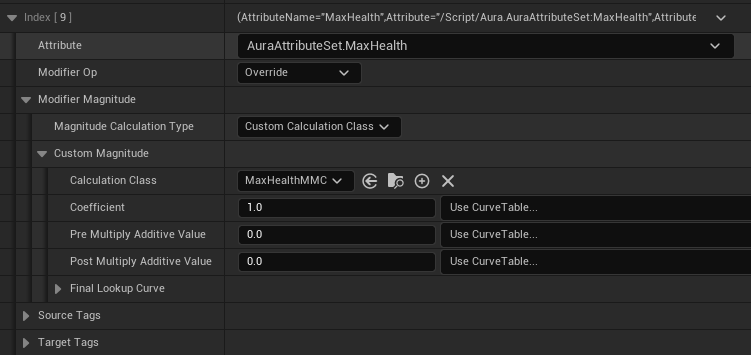
如果基于Actor属性的计算无法满足需求,可以选择该计算类型,它通过继承UGameplayModMagnitudeCalculation类(后文简称MMC类),重写float CalculateBaseMagnitude_Implementation()函数以自定义属性值的计算(例如获取其他Actor的属性和它的变量来计算该属性值)。
例如在Aura项目中,主角Aura的MaxHealth属性基于如下公式计算:
可以发现,MaxHealth属性依赖于参考属性Vigor和玩家等级变量PlayerLevel,适合通过该计算类型计算。相关MMC类代码如下:
MaxHealthMMC.h点击展开/折叠代码
UCLASS()
class AURA_API UMaxHealthMMC : public UGameplayModMagnitudeCalculation
{
    GENERATED_BODY()

public:
    UMaxHealthMMC();

    virtual float CalculateBaseMagnitude_Implementation(const FGameplayEffectSpec& Spec) const override;

private:
    FGameplayEffectAttributeCaptureDefinition VigorDef;
};
MaxHealthMMC.cpp点击展开/折叠代码
UMaxHealthMMC::UMaxHealthMMC()
{
    // 1.初始化要捕获的Attribute信息:
    VigorDef.AttributeToCapture = UAuraAttributeSet::GetVigorAttribute();
    VigorDef.AttributeSource = EGameplayEffectAttributeCaptureSource::Target;
    VigorDef.bSnapshot = false;
    // 2.将该Attribute信息加入要捕获的Attribute数组中
    RelevantAttributesToCapture.Add(VigorDef);
}

float UMaxHealthMMC::CalculateBaseMagnitude_Implementation(const FGameplayEffectSpec& Spec) const
{
    // 获取Source Actor和Target Actor的GameplayTags待用
    const FGameplayTagContainer* SourceTags = Spec.CapturedSourceTags.GetAggregatedTags();
    const FGameplayTagContainer* TargetTags = Spec.CapturedTargetTags.GetAggregatedTags();

    // 用于获取参考Attributes值函数的参数
    FAggregatorEvaluateParameters EvalParams;
    EvalParams.SourceTags = SourceTags;
    EvalParams.TargetTags = TargetTags;

    // 获取目标Attribute值
    float TargetVigorValue = 0.f;
    GetCapturedAttributeMagnitude(VigorDef, Spec, EvalParams, TargetVigorValue);

    // 自定义计算: MaxHealth = 80.0 + 2.5 * Vigor + 10.0 * PlayerLevel
    TargetVigorValue = FMath::Max<float>(TargetVigorValue, 0.f);
    float MaxHealth = 0.f;
    if (UObject* Player = Spec.GetContext().GetSourceObject();
        Player && Player->Implements<UCombatInterface>())
    {
        const TScriptInterface<ICombatInterface> PlayerCombatInterface = TScriptInterface<ICombatInterface>(Player);
        const int32 PlayerLevel = PlayerCombatInterface->GetActorLevel();
        MaxHealth = 80.f + 2.5f * TargetVigorValue + 10.f * PlayerLevel;
    }
    else
    {
        UE_LOG(LogTemp, Error, TEXT("[%hs] Target actor is not player (Not implements ICombatInterface)"), __FUNCTION__);
    }

    return MaxHealth;
}
其中:
- 为了获取Aura参考属性Vigor,要定义并初始化属性描述相关信息
FGameplayEffectAttributeCaptureDefinition,并将其加入要捕获Attribute数组RelevantAttributesToCapture中; - 在MMC计算函数中,通过
GetCapturedAttributeMagnitude()获取要参考的Attribute信息,最终返回计算好的float类型的MaxHealth值;
实现MMC类后,就能在编辑器中编辑相关GE了:
Set By Caller
该计算类型将GE结果值交给GE的调用者在运行时动态设置,对于根据上下文决定数值的场景(如造成伤害)十分灵活方便。该计算类型维护一个键值对,需要在编辑器侧确认键的类型(FName或FGameplayTag),在代码侧通过GESpec.SetSetByCallerMagnitude(Key, Value)函数确认值。
例如在Aura项目中投射物对被击中的Actor施加伤害GE,其中的伤害值就是通过该计算类型确认的:
-
在编辑器中新建施加伤害的
GE_Damage,编辑Modifier,设置Attribute和GameplayTag: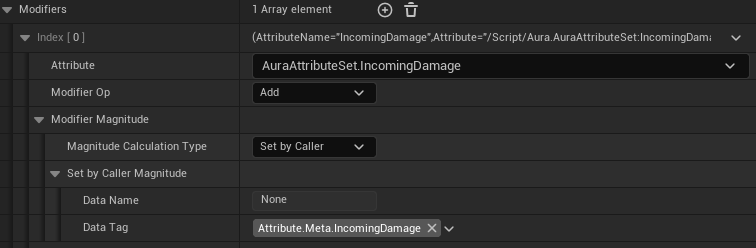
-
在C++代码侧生成投射物的GA中,通过
GESpec.SetSetByCallerMagnitude()确认伤害值:AuraProjectileSpell.cpp点击展开/折叠代码
// ...// 赋予投射物相关GEconst UAbilitySystemComponent* SourceASC = UAbilitySystemBlueprintLibrary::GetAbilitySystemComponent(Owner);const FGameplayEffectSpecHandle GESpecHandle = SourceASC->MakeOutgoingSpec(DamageEffectClass, GetAbilityLevel(),SourceASC->MakeEffectContext());// 这里的Damage是FScalableFloat类型, 可通过配表的方式配置数值const float ScaledDamage = Damage.GetValueAtLevel(GetAbilityLevel());GESpecHandle.Data->SetSetByCallerMagnitude(AuraGameplayTags::Attribute::Meta::IncomingDamage.GetTag(),ScaledDamage);// ...
这样投射物对目标Actor造成的伤害值就能通过GE的Source Actor确认了。
多个Modifier的执行顺序
如果一个GE中有多个Modifier,执行顺序为该数组的索引顺序(从小到大)。
Execution
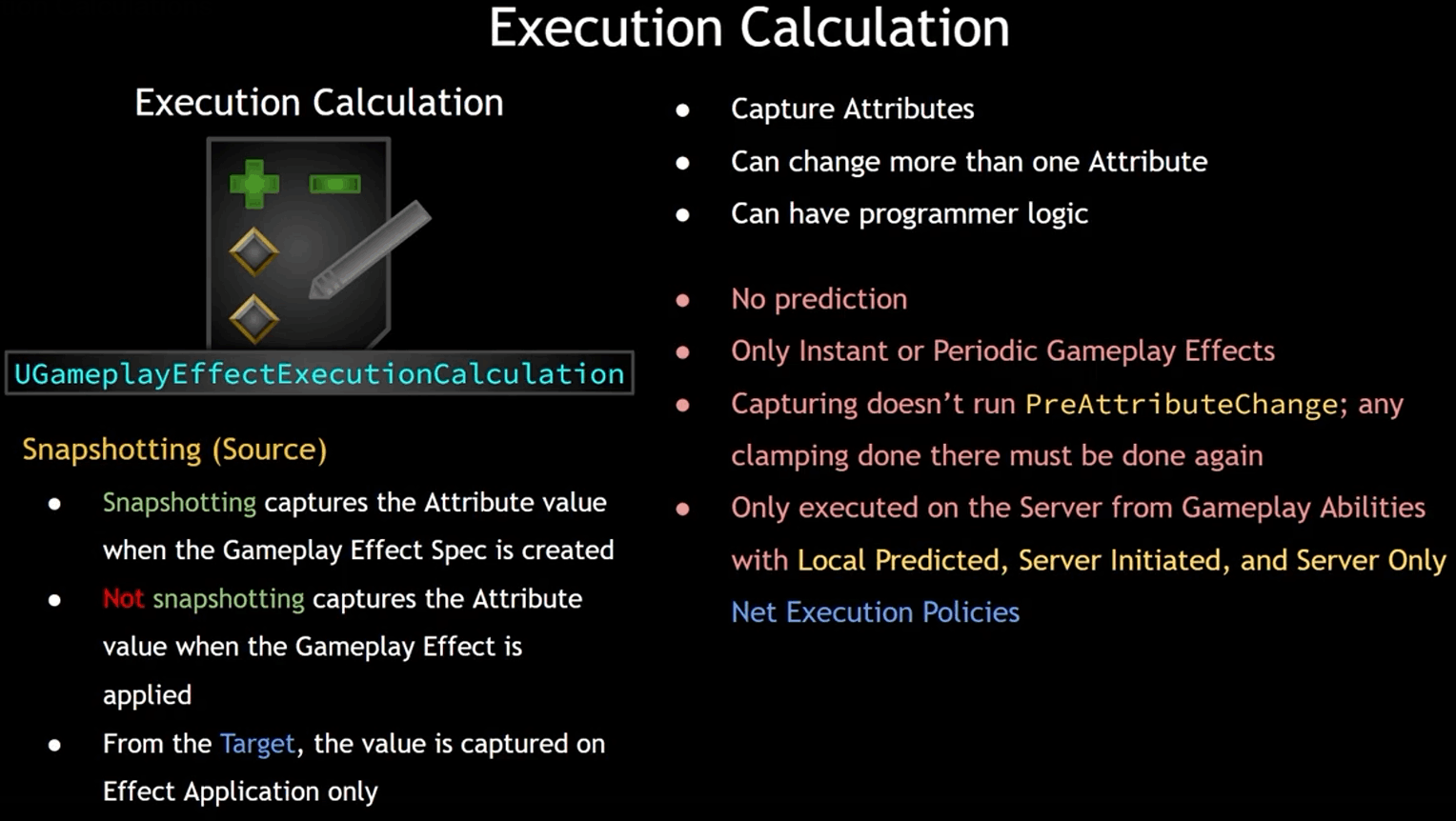
Execution使用 UGameplayEffectExecutionCalculation 来定义GE在运行时具有的自定义行为。如果Modifier仍无法满足需求,可以使用此方式更自由地修改Attribute,它支持通过编程实现逻辑。
Execution通过捕捉Attribute以改变一个或更多Attributes:
- 捕捉来自Source的Attribute:
- 使用Snapshotting:当
UGameplayEffectSpec被创建时,进行捕捉操作; - 不使用Snapshotting:当GE被施加时,进行捕捉操作;
- 使用Snapshotting:当
- 捕捉来自Target的Attribute:当GE被应用时,进行捕捉操作;
此外还需要注意的是,Execution:
- 不支持本地预测;
- 只支持Instant或Periodic类型的GE;
- 捕捉Attribute时不触发
PreAttributeChange(),因此类如Clamping的操作需要再做一次; - 只能通过Net Execution Policies是Local Predicted、Server Initiated或Server Only的GA在服务器上执行;
在Aura项目中,角色受到的伤害由AttributeSet内部统一计算:外部GE对角色造成的伤害统一由IncomingDamage属性接收,然后交由Execute自定义计算类ExecCalc_Damage进行计算,其中会涉及到Block Chance阻挡率的格挡计算,Armor护甲等属性的减伤计算,以及CriticalHit暴击相关属性计算。最后将剩下的伤害交给AttributeSet进一步处理。
ExecCalc_Damage类的代码实现如下,涉及到如何捕获,修改并应用Attribute等内容:
ExecCalc_Damage.h点击展开/折叠代码
#pragma once
#include "CoreMinimal.h"
#include "GameplayEffectExecutionCalculation.h"
#include "AbilitySystem/AuraAttributeSet.h"
#include "ExecCalc_Damage.generated.h"

struct AuraDamageAttributeStatics
{
    // Attribute捕获声明宏, 用于快速声明Attribute捕获相关变量
    DECLARE_ATTRIBUTE_CAPTUREDEF(Armor);
    DECLARE_ATTRIBUTE_CAPTUREDEF(ArmorPenetration);
    DECLARE_ATTRIBUTE_CAPTUREDEF(BlockChance);
    DECLARE_ATTRIBUTE_CAPTUREDEF(CriticalHitChance);
    DECLARE_ATTRIBUTE_CAPTUREDEF(CriticalHitResistance);
    DECLARE_ATTRIBUTE_CAPTUREDEF(CriticalHitBonusDamage);

    AuraDamageAttributeStatics()
    {
        // Attribute捕获定义宏, 参数: (AttributeSet类, Attribute名, 捕获来源Target/Source, 是否Snapshot(ture/false))
        DEFINE_ATTRIBUTE_CAPTUREDEF(UAuraAttributeSet, Armor, Target, false);
        DEFINE_ATTRIBUTE_CAPTUREDEF(UAuraAttributeSet, ArmorPenetration, Source, false);
        DEFINE_ATTRIBUTE_CAPTUREDEF(UAuraAttributeSet, BlockChance, Target, false);
        DEFINE_ATTRIBUTE_CAPTUREDEF(UAuraAttributeSet, CriticalHitChance, Source, false);
        DEFINE_ATTRIBUTE_CAPTUREDEF(UAuraAttributeSet, CriticalHitResistance, Target, false);
        DEFINE_ATTRIBUTE_CAPTUREDEF(UAuraAttributeSet, CriticalHitBonusDamage, Source, false);
    }

    // 单例方法
    static AuraDamageAttributeStatics& Get()
    {
        static AuraDamageAttributeStatics Instance;
        return Instance;
    }
};

UCLASS()
class AURA_API UExecCalc_Damage : public UGameplayEffectExecutionCalculation
{
    GENERATED_BODY()

public:
    UExecCalc_Damage();

    // 具体计算过程在此函数中
    virtual void Execute_Implementation(const FGameplayEffectCustomExecutionParameters& ExecutionParams,
                                        FGameplayEffectCustomExecutionOutput& OutExecutionOutput) const override;
};
ExecCalc_Damage.cpp点击展开/折叠代码
#include "AbilitySystem/ExecCalc/ExecCalc_Damage.h"

#include "AbilitySystemComponent.h"
#include "AbilitySystem/AuraAbilitySystemLibrary.h"
#include "AbilitySystem/Data/CharacterClassInfo.h"
#include "Game/AuraGameplayTags.h"
#include "Interaction/Interface/CombatInterface.h"


UExecCalc_Damage::UExecCalc_Damage()
{
    // 将定义好的Attribute捕获对象添加到本类的捕获列表中
    RelevantAttributesToCapture.Add(AuraDamageAttributeStatics::Get().ArmorDef);
    RelevantAttributesToCapture.Add(AuraDamageAttributeStatics::Get().ArmorPenetrationDef);
    RelevantAttributesToCapture.Add(AuraDamageAttributeStatics::Get().BlockChanceDef);
    RelevantAttributesToCapture.Add(AuraDamageAttributeStatics::Get().CriticalHitChanceDef);
    RelevantAttributesToCapture.Add(AuraDamageAttributeStatics::Get().CriticalHitResistanceDef);
    RelevantAttributesToCapture.Add(AuraDamageAttributeStatics::Get().CriticalHitBonusDamageDef);
}

void UExecCalc_Damage::Execute_Implementation(const FGameplayEffectCustomExecutionParameters& ExecutionParams,
                                              FGameplayEffectCustomExecutionOutput& OutExecutionOutput) const
{
    // 获取必要信息
    const FGameplayEffectSpec& GESpec = ExecutionParams.GetOwningSpec();
    const UAbilitySystemComponent* SourceASC = ExecutionParams.GetSourceAbilitySystemComponent();
    const UAbilitySystemComponent* TargetASC = ExecutionParams.GetTargetAbilitySystemComponent();
    AActor* SourceAvatarActor = SourceASC ? SourceASC->GetAvatarActor() : nullptr;
    AActor* TargetAvatarActor = TargetASC ? TargetASC->GetAvatarActor() : nullptr;
    TScriptInterface<ICombatInterface> SourceCombatInterface = (SourceAvatarActor && SourceAvatarActor->Implements<UCombatInterface>())
                                                                   ? TScriptInterface<ICombatInterface>(SourceAvatarActor)
                                                                   : nullptr;
    TScriptInterface<ICombatInterface> TargetCombatInterface = (TargetAvatarActor && TargetAvatarActor->Implements<UCombatInterface>())
                                                                   ? TScriptInterface<ICombatInterface>(TargetAvatarActor)
                                                                   : nullptr;

    // 设置捕捉Attribute需要的参数
    FAggregatorEvaluateParameters EvaluateParameters;
    EvaluateParameters.SourceTags = GESpec.CapturedSourceTags.GetAggregatedTags();
    EvaluateParameters.TargetTags = GESpec.CapturedTargetTags.GetAggregatedTags();

    // 通过SetByCaller获取Damage
    float Damage = GESpec.GetSetByCallerMagnitude(AuraGameplayTags::Attribute::Meta::IncomingDamage.GetTag());

#pragma region 伤害计算: BlockChance部分
    // 捕捉Target的BlockChance: 用于判断是否成功格挡, 是则Damage减半
    float TargetBlockChance = 0.f;
    ExecutionParams.AttemptCalculateCapturedAttributeMagnitude(AuraDamageAttributeStatics::Get().BlockChanceDef, EvaluateParameters,
                                                               TargetBlockChance);
    TargetBlockChance = FMath::Max<float>(TargetBlockChance, 0.f);

    const bool bSuccessfulBlock = FMath::RandRange(1, 100) <= TargetBlockChance;
    Damage = bSuccessfulBlock ? Damage * 0.5f : Damage;
#pragma endregion

#pragma region 伤害计算: Armor和ArmorPenetration部分
    // 捕捉Target的Armor: 按一定百分比忽略Damage部分值
    float TargetArmor = 0.f;
    ExecutionParams.AttemptCalculateCapturedAttributeMagnitude(AuraDamageAttributeStatics::Get().ArmorDef, EvaluateParameters, TargetArmor);
    TargetArmor = FMath::Max<float>(TargetArmor, 0.f);

    // 捕捉Source的ArmorPenetration: 按一定的百分比忽略TargetArmor部分值
    float SourceArmorPenetration = 0.f;
    ExecutionParams.AttemptCalculateCapturedAttributeMagnitude(AuraDamageAttributeStatics::Get().ArmorPenetrationDef, EvaluateParameters,
                                                               SourceArmorPenetration);
    SourceArmorPenetration = FMath::Max<float>(SourceArmorPenetration, 0.f);

    // 获取CurveTable上的相关计算系数
    UCharacterClassInfo* EnemyCharacterClassInfo = UAuraAbilitySystemLibrary::GetEnemyCharacterClassInfo(SourceAvatarActor);
    FRealCurve* ArmorPenetrationCoefCurve = EnemyCharacterClassInfo->DamageCalcCoefficientTable->FindCurve(FName("ArmorPenetration"), {});
    float ArmorPenetrationCoef = (SourceCombatInterface && ArmorPenetrationCoefCurve)
                                     ? ArmorPenetrationCoefCurve->Eval(SourceCombatInterface->GetActorLevel())
                                     : 0.5f;
    FRealCurve* EffectiveArmorCoefCurve = EnemyCharacterClassInfo->DamageCalcCoefficientTable->FindCurve(FName("EffectiveArmor"), {});
    float EffectiveArmorCoef = (TargetCombatInterface && EffectiveArmorCoefCurve)
                                   ? EffectiveArmorCoefCurve->Eval(TargetCombatInterface->GetActorLevel())
                                   : 0.333f;

    float EffectiveTargetArmor = TargetArmor * (100.f - SourceArmorPenetration * ArmorPenetrationCoef) / 100.f;
    Damage = Damage * (100.f - EffectiveTargetArmor * EffectiveArmorCoef) / 100.f;
#pragma endregion

#pragma region 伤害计算: CriticalHit部分
    // 捕捉Source的CriticalHitChance: 暴击率, 暴击将造成双倍伤害+暴击补偿伤害
    float SourceCriticalHitChance = 0.f;
    ExecutionParams.AttemptCalculateCapturedAttributeMagnitude(AuraDamageAttributeStatics::Get().CriticalHitChanceDef, EvaluateParameters,
                                                               SourceCriticalHitChance);
    SourceCriticalHitChance = FMath::Max<float>(SourceCriticalHitChance, 0.f);

    // 捕捉Target的CriticalHitResistance: 百分比减少来自敌人攻击的暴击率
    float TargetCriticalHitResistance = 0.f;
    ExecutionParams.AttemptCalculateCapturedAttributeMagnitude(AuraDamageAttributeStatics::Get().CriticalHitResistanceDef,
                                                               EvaluateParameters, TargetCriticalHitResistance);
    TargetCriticalHitResistance = FMath::Max<float>(TargetCriticalHitResistance, 0.f);

    // 捕捉Source的CriticalHitBonusDamage: 暴击补偿伤害
    float SourceCriticalHitBonusDamage = 0.f;
    ExecutionParams.AttemptCalculateCapturedAttributeMagnitude(AuraDamageAttributeStatics::Get().CriticalHitBonusDamageDef,
                                                               EvaluateParameters, SourceCriticalHitBonusDamage);
    SourceCriticalHitBonusDamage = FMath::Max<float>(SourceCriticalHitBonusDamage, 0.f);

    FRealCurve* CriticalHitResCoefCurve = EnemyCharacterClassInfo->DamageCalcCoefficientTable->
                                                                   FindCurve(FName("CriticalHitResistance"), {});
    float CriticalHitResCoef = (TargetCombatInterface && CriticalHitResCoefCurve)
                                   ? CriticalHitResCoefCurve->Eval(TargetCombatInterface->GetActorLevel())
                                   : 0.15f;
    const float EffectiveCriticalHitChance = FMath::Max<float>(SourceCriticalHitChance - TargetCriticalHitResistance * CriticalHitResCoef,
                                                               0.f);
    const bool bSuccessfulCriticalHit = FMath::RandRange(1, 100) <= EffectiveCriticalHitChance;
    Damage = bSuccessfulCriticalHit ? Damage * 2.f + SourceCriticalHitBonusDamage : Damage;
#pragma endregion

    // 修改IncomingDamage属性的值为Damage, 并应用
    Damage = FMath::Max<float>(Damage, 0.f);
    const FGameplayModifierEvaluatedData EvaluatedData(UAuraAttributeSet::GetIncomingDamageAttribute(), EGameplayModOp::Additive, Damage);
    OutExecutionOutput.AddOutputModifier(EvaluatedData);
}
Gameplay Cues
GE还可触发一些Gameplay Cues,有关Gameplay Cues详见 文章(TODO)。
Stacking
负责多个GE生效时的堆叠处理,可通过Limit Count设置该类GE的最大堆叠上限,通过Stacking Type设置堆叠种类。后者的有两个选项:
- Aggregate by Source:多个Source Actor为当前Target Actor施加GE时,为每个Source Actor持有Stack计数。即同一Source Actor对任意Target Actor施加超过当前计数的GE时,超过计数的GE暂时不生效。
- Aggregate by Target:多个Source Actor为当前Targe t Actor施加GE时,为当前Target Actor持有Stack计数。即任意Source Actor对同一Target Actor施加超过计数的GE时,超过计数的GE暂时不生效。
常用操作
对目标Actor施加GE
要想对目标Actor施加GE,需要完成如下步骤:
- 获取目标Actor自己的ASC;
- 通过
TargetASC->MakeEffectContext(),创建FGameplayEffectContexxtHandle(封装GEContext和工具函数),并通过它的AddSourceXXX()成员函数添加Source Actor或其他SourceUObject类; - 通过
TargetASC->MakeOutgoingSpec()创建FGameplayEffectSpecHandle(封装GESpec和工具函数),将GE实例化; - 通过
TargetASC->ApplayGameplayEffectSpecToSelf(),对目标Actor的ASC施加GE; - 【可选】对于持续时间无限的GE,需要存储激活它的
FActiveGameplayEffectHandle,以便后续通过TargetASC->RemoveActiveGameplayEffect()移除;
例如在Aura项目中,Source Actor 对 Target Actor 施加 GE 的通用函数如下:
AuraEffectActor.cpp点击展开/折叠代码
void AAuraEffectActor::ApplyEffectToTarget(AActor* InTargetActor, const FEffectActorGE& InEffectActorGE)
{
    if (InTargetActor->Implements<UAbilitySystemInterface>())
    {
        checkf(InEffectActorGE.GEClass, TEXT("[%hs] GEClass is empty, please fill out in editor!"), __FUNCTION__);

        // 1. 获取Target自己的ASC
        const TScriptInterface<IAbilitySystemInterface> ASCInterface = TScriptInterface<IAbilitySystemInterface>(
            InTargetActor);
        UAbilitySystemComponent* TargetActorAsc = ASCInterface->GetAbilitySystemComponent();
        // 2. 创建GEContextHandle(封装GEContext + 工具函数)
        FGameplayEffectContextHandle GEContextHandle = TargetActorAsc->MakeEffectContext();
        GEContextHandle.AddSourceObject(this);
        // 3. 创建GESpecHandle(封装GESpec + 工具函数)
        const FGameplayEffectSpecHandle GESpecHandle = TargetActorAsc->MakeOutgoingSpec(
            InEffectActorGE.GEClass, InEffectActorGE.GELevel, GEContextHandle);
        // 4. 对Target自己的ASC施加GE
        const FActiveGameplayEffectHandle ActiveGEHandle = TargetActorAsc->ApplyGameplayEffectSpecToSelf(
            *GESpecHandle.Data);

        // 5. 对于Infinite类GE, 需要存储激活它的FActiveGameplayEffectHandle, 以便后续移除它
        if (GESpecHandle.Data->Def->DurationPolicy == EGameplayEffectDurationType::Infinite &&
            InEffectActorGE.GERemovalPolicy == EEffectRemovalPolicy::EERP_RemoveOnEndOverlap)
        {
            ActiveInfiniteGEHandles.Add(ActiveGEHandle, TargetActorAsc);
        }
    }

    // 获取ASC的另一个方法:
    // UAbilitySystemBlueprintLibrary::GetAbilitySystemComponent(Target);
}